Tutorial: Using Your Code With DisCoTec
So you want to solve your timestepped PDE problem with the DisCoTec framework. You already have a PDE solver that can do it on a regular structured grid. This Tutorial gives you an outline of the steps required.
Your Code Interface: Init, Timestep, Get/Set Full Grid, Finish
The first step is to prepare your code in a way that it can be called by DisCoTec. Typically, your PDE solver code will look similar to this (in pseudocode):
int num_points_x = ...
int num_points_y = ...
int num_points_z = ...
int num_points_vx = ...
int num_points_vy = ...
int num_points_vz = ...
...
initial_function = ...
grid.initialize(
                initial_function,
                num_points_x,
                num_points_y,
                num_points_z,
                num_points_vx,
                num_points_vy,
                num_points_vz,
                ...
               )
helper_data_structures.initialize(...)
float end_time = ...
float time_step = ...
float time_now = 0.0;

while(time_now < end_time) { # time loop
    do_timestep(grid, time_step)
    time_now += time_step
}

properties = compute_properties(grid)
write_output(properties, grid)
This example assumes that your PDE solver uses three dimensions in both space and velocity.
For use with DisCoTec, we assume nestable power-of-two discretizations, i.e.,
where your grid spacing can be \(2^{-l}\) for \(l \in \mathbb{N}\).
For simplicity, in this tutorial we also assume you use periodic boundary
conditions and all num_points_ are chosen as powers of two.
You need to transform your current solver code into stateful functions, or a
stateful data structure.
Let’s say you introduce a class YourSolver: computations before the time
loop go into its constructor
or an init() function (if your code uses MPI, this is also where a
sub-communicator should be passed for YourSolver to use).
Computation in the time loop goes into its run() function.
Anything after the time loop goes into the destructor or a function
finalize().
Then, the following should do the same:
int num_points_x = ...
int num_points_y = ...
int num_points_z = ...
int num_points_vx = ...
int num_points_vy = ...
int num_points_vz = ...
...

- initial_function = ...
- grid.initialize(
-                 initial_function,
-                 num_points_x,
-                 num_points_y,
-                 num_points_z,
-                 num_points_vx,
-                 num_points_vy,
-                 num_points_vz,
-                 ...
-                )
- helper_data_structures.initialize(...)
+ my_solver = YourSolver(
+                                num_points_x,
+                                num_points_y,
+                                num_points_z,
+                                num_points_vx,
+                                num_points_vy,
+                                num_points_vz,
+                                ...
+                               )
float end_time = ...
float time_step = ...
float time_now = 0.0;

while(time_now < end_time) { # time loop
-    do_timestep(grid, time_step)
+    my_solver.run(time_step)
    time_now += time_step
}

- properties = compute_properties(grid)
- write_output(properties, grid)
+ my_solver.finalize()
This setup assumes that we can pass the number of grid points per dimension in
your high-d contiguous array as arguments.
In addition, you will need an interface that allows DisCoTec to get and set
this data.
The most portable and memory-efficient way of doing so is to provide a pointer
to the beginning of the contiguous array.
Let’s call this getter get_tensor_pointer.
Make Your PDE Solver a DisCoTec Task and Your Grid a DisCoTec DistributedFullGrid
From now on, we assume that the interface to YourSolver is wrapped in a
C++ header YourSolver.h, roughly like this:
#include <vector>

class YourSolver {
 public:
  YourSolver(int num_points_x, int num_points_y, int num_points_z,
             int num_points_vx, int num_points_vy, int num_points_vz,
             ...);
  //...rule of 5...

  void run(double time_step);

  double* get_tensor_pointer();

  void finalize();
};
Now, DisCoTec comes into play. Create a new folder or project that can access
both YourSolver and DisCoTec.
For the combination technique, multiple instances of YourSolver will be
instantiated, each at different resolutions.
The Task class is the interface you will need to implement.
With YourSolver, that will be as simple as:
#include <memory>

// discotec includes, you may have to use a longer path here
#include "discotec/fullgrid/DistributedFullGrid.hpp"
#include "discotec/task/Task.hpp"
#include "discotec/utils/PowerOfTwo.hpp"
#include "discotec/utils/Types.hpp"

#include "YourSolver.h"

// The CombiDataType template parameter defaults to double.
// In this tutorial we use a plain double so the example compiles in isolation.
// In your own code, you can instead alias this to combigrid::CombiDataType
// (from your project's Config.hpp or equivalent) once you include that header.
// DIM is a compile-time constant for the dimensionality (1-6).
using CombiDataType = double;
static constexpr combigrid::DimType DIM = 6;

class YourTask : public combigrid::Task<CombiDataType> {
 public:
  YourTask(combigrid::LevelVector& l,
           const std::vector<combigrid::BoundaryType>& boundary,
           combigrid::real coeff,
           combigrid::real dt)
      : Task<CombiDataType>(DIM, l, boundary, coeff, nullptr, nullptr),
        sim_(nullptr), dfg_(nullptr), dt_(dt) {}

  virtual ~YourTask(){
    if (sim_ != nullptr){
      sim_->finalize();
    }
  }

  void init(combigrid::CommunicatorType lcomm,
            const std::vector<combigrid::IndexVector>& decomposition =
                std::vector<combigrid::IndexVector>()) override {
    // DisCoTec assumes Fortran (column-major) ordering,
    // if you use C (row-major) ordering, you
    // need to assign the levels in reverse order
    const auto& l = this->getLevelVector();
    int num_points_x = combigrid::powerOfTwoByBitshift(l[0]);
    int num_points_y = combigrid::powerOfTwoByBitshift(l[1]);
    int num_points_z = combigrid::powerOfTwoByBitshift(l[2]);
    int num_points_vx = combigrid::powerOfTwoByBitshift(l[3]);
    int num_points_vy = combigrid::powerOfTwoByBitshift(l[4]);
    int num_points_vz = combigrid::powerOfTwoByBitshift(l[5]);

    // this is the number of MPI processes in each dimension --
    // if all are 1, we are only using the parallelism between grids
    std::vector<int> p = {1, 1, 1, 1, 1, 1};

    // if using MPI within your solver,
    // pass p and the lcomm communicator to sim_, too
    sim_ =
        std::make_unique<YourSolver>(num_points_x, num_points_y, num_points_z,
                                     num_points_vx, num_points_vy, num_points_vz);
    // wrap tensor in a DistributedFullGrid
    dfg_ = std::make_unique<combigrid::DistributedFullGrid<CombiDataType, DIM>>(
        DIM, this->getLevelVector(), lcomm, this->getBoundary(),
        sim_->get_tensor_pointer(), p, false, decomposition);
  }

  void run(combigrid::CommunicatorType lcomm) override { sim_->run(dt_); }

  combigrid::DistributedFullGridRef<CombiDataType> getDistributedFullGrid(
      size_t n = 0) override {
    return *dfg_;
  }

  void setZero() override { dfg_->setZero(); }

  std::unique_ptr<YourSolver> sim_;
  std::unique_ptr<combigrid::DistributedFullGrid<CombiDataType, DIM>> dfg_;
  double dt_;
};
Note that this also turns your data into a DistributedFullGrid, without
making a copy of the data.
DistributedFullGrid<CombiDataType, DIM> takes two template parameters:
the data type (CombiDataType, typically double) and the dimensionality
DIM as a compile-time constant (between 1 and 6).
The compile-time DIM enables fixed-size std::array types internally
for better performance.
Task<CombiDataType> and ProcessGroupWorker<CombiDataType> are also
templated on the data type (defaulting to double).
DisCoTec just assumes that you pass it a pointer to a correctly-sized
contiguous array.
The size of the whole “global” grid is \(2^{l_d}\), with \(l_d\) the level vector
for each dimension \(d\).
Every MPI process in your solver should then have \(2^{l_d} / p_d\) grid
points, where \(p\) is the Cartesian process vector
containing the number of processes per dimension in each process group.
Make Your MPI Processes Workers
Now, you can use the YourTask class to instantiate many tasks as part of a
combination scheme.
There are a lot of choices to make regarding the combined simulation run,
which is why more than half of the example code is dedicated to defining
parameters and generating input data structures:
#include <string>
#include <vector>

// discotec includes, you may have to use a longer path here
#include "discotec/combischeme/CombiMinMaxScheme.hpp"
#include "discotec/manager/CombiParameters.hpp"
#include "discotec/manager/ProcessGroupWorker.hpp"
#include "discotec/task/Task.hpp"
#include "discotec/utils/Stats.hpp"
#include "discotec/utils/Types.hpp"

// include user task
#include "YourTask.h"

int main(int argc, char** argv) {
  static_assert(!combigrid::ENABLE_FT);  // no fault tolerance in this example
  [[maybe_unused]] auto mpiOnOff = combigrid::MpiOnOff(&argc, &argv);  // initialize MPI

  // number of process groups and number of processes per group
  const size_t ngroup = 8;
  const size_t nprocs = 1;

  // divide the MPI processes into process group and initialize the
  // corresponding communicators
  combigrid::theMPISystem()->initWorldReusable(MPI_COMM_WORLD, ngroup, nprocs, false, true);

  // input parameters
  const combigrid::DimType dim = 6;  // six-dimensional problem
  const combigrid::LevelVector lmin = {
      2, 2, 2,
      2, 2, 2};  // minimal level vector for each grid -> have at least 4 points in each dimension
  const combigrid::LevelVector lmax = {6, 6, 6, 6, 6, 6};  // maximum level vector -> level vector of target grid
  const std::vector<int> p = {
      1, 1, 1, 1, 1, 1};  // parallelization of domain (one process per dimension) -> must match nprocs
  const std::vector<bool> hierarchizationDims(dim, true);  // all dimensions should be hierarchized
  const std::vector<combigrid::BoundaryType> boundary(dim,
                                                      1);  // periodic boundary in every dimension
  const combigrid::real dt = 0.01;                         // time step
  const size_t ncombi = 20;                                // number of combinations
  // hierarchical basis functions for intermediate representation
  const std::string basis = "biorthogonal_periodic";
  // algorithm variant for data exchange between groups
  const combigrid::CombinationVariant combinationVariant =
      combigrid::CombinationVariant::subspaceReduce;

  // generate combination scheme from parameters
  std::vector<combigrid::LevelVector> levels;  // level vector for each component grid
  std::vector<combigrid::real> coeffs;         // combination coefficient for each component grid
  std::vector<size_t> taskNumbers;             // only used in case of static task assignment
  {
    const auto& pgroupNumber = combigrid::theMPISystem()->getProcessGroupNumber();
    auto scheme = combigrid::CombiMinMaxScheme(dim, lmin, lmax);
    scheme.createClassicalCombischeme();
    size_t totalNumTasks = combigrid::getLoadBalancedLevels(
        scheme, pgroupNumber, combigrid::theMPISystem()->getNumGroups(), boundary, levels, coeffs,
        taskNumbers);

    MASTER_EXCLUSIVE_SECTION {
      std::cout << combigrid::getTimeStamp() << " Process group " << pgroupNumber << " will run "
                << levels.size() << " of " << totalNumTasks << " tasks." << std::endl;
    }
  }
These parameter values shold be suitable for a very small-scale proof-of-concept. The last scope assigns tasks (i.e. your PDE solver instances) to process groups statically.
The remaining part of the code looks a lot like your initial time loop again:
  {
    // ProcessGroupWorker is also templated on CombiDataType (defaults to double)
    combigrid::ProcessGroupWorker<> worker;

    // create combiparamters
    combigrid::CombiParameters params(dim, lmin, lmax, boundary, levels, coeffs,
                                      hierarchizationDims, taskNumbers, ncombi, 1,
                                      combinationVariant);
    setCombiParametersHierarchicalBasesUniform(params, basis);
    params.setParallelization(p);
    worker.setCombiParameters(std::move(params));

    // initialize individual tasks (component grids)
    for (size_t i = 0; i < levels.size(); i++) {
      worker.initializeTask(
          std::unique_ptr<combigrid::Task<>>(new YourTask(levels[i], boundary, coeffs[i], dt)));
    }

    worker.initCombinedDSGVector();
    worker.zeroDsgsData();  // initialize sparse grid data structures

    for (size_t i = 0; i < ncombi; ++i) {
      // run tasks for next time interval
      worker.runAllTasks();
      worker.combineAtOnce();
    }

    MIDDLE_PROCESS_EXCLUSIVE_SECTION {
      std::cout << combigrid::getTimeStamp() << " Performed " << ncombi << " combinations."
                << std::endl;
    }
  }
  return 0;
}
Instantiating a ProcessGroupWorker at the beginning of the scope sets up some
data structures, in particular a TaskWorker and a SparseGridWorker.
Coming back to the parallelism in DisCoTec:
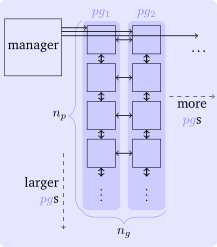
The TaskWorker deals with the task execution and other within-group
operations (vertical in the graphics), while the SparseGridWorker handles the
operations across groups, such as the reduction in the combination
(horizontal in the graphics).
The ProcessGroupWorker bundles the two and adds abstracts functions required
for further control hierarchies.
If you want to add further functionality to DisCoTec, this would be a typical
extension point.
Otherwise, it’s just where functions are encapsulated for you to use!
Combine
Compile the code using your familiar build tools. MPI and DisCoTec should be the only immediate dependencies.
$ mpiexec -n 8 ./tutorial_example
MPI: 8 groups with 1 ranks each with 1 threads each and 1-fold nested parallelism; without world manager
[20240912T133902]  Process group 5 will run 5 of 35 tasks.
[20240912T133902]  Process group 7 will run 4 of 35 tasks.
[20240912T133902]  Process group 4 will run 5 of 35 tasks.
[20240912T133902]  Process group 6 will run 5 of 35 tasks.
[20240912T133902]  Process group 0 will run 4 of 35 tasks.
[20240912T133902]  Process group 2 will run 4 of 35 tasks.
[20240912T133902]  Process group 3 will run 4 of 35 tasks.
[20240912T133902]  Process group 1 will run 4 of 35 tasks.
Found max. 7 different communicators for subspaces
[20240912T133902]  Performed 20 combinations.
Depending on your use case, now you need to evaluate: are the results “good” (in your own metric)? You can evaluate this, for instance, by Monte-Carlo integration of the error compared to a reference solution (example here), or by combining output files as a postprocessing step (example here).
This is your starting point for playing with the combination technique:
How do the minimum and maximum resolution affect the results?
Can you see a difference when using different hierarchical basis functions?
Can you do multiple time steps per combination? Do you have to combine at all to get the required accuracy?
If you need to go to a larger scale or want to further customize the combination behavior, keep reading on about advanced topics.